
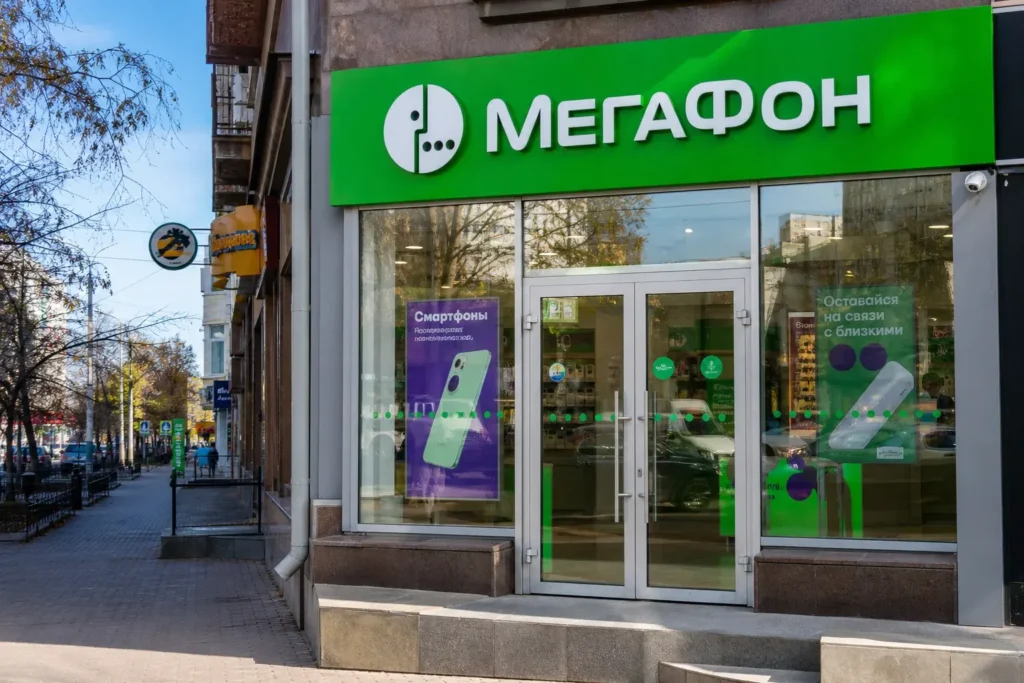
Getting a local SIM card in Yekaterinburg means choosing between quick tourist options and more involved procedures for longer stays. As of October 2026, the process has been streamlined compared to earlier 2025 but still requires government registration through Russia’s Gosuslugi portal.
This guide explains how to get a local SIM card in Yekaterinburg for both short-term visitors and those staying longer. The recommended option for most visitors: buy at an operator store (MTS, Beeline or MegaFon) with your passport and migration card.
Current access notice: As of October 2026, the Gosuslugi registration requirement (introduced January 1, 2025) remains in effect for all foreigners. For tourists staying under 90 days, registration now happens in-store and takes 30–45 minutes. Tourists no longer need to complete this in advance. Visitors staying longer than 90 days must obtain a SNILS and verify their Gosuslugi account before visiting an operator store. Check the official Roskomnadzor website (rkn.gov.ru) for any future regulatory changes.
Quick answer: For tourists staying under 90 days: visit an MTS, Beeline, or MegaFon store with your passport and migration card. Registration through Gosuslugi happens in-store and takes 30–45 minutes. For stays over 90 days: complete SNILS registration, Gosuslugi verification, and biometric enrollment first, then buy the SIM. Total time varies from 45 minutes to several days depending on your stay length and whether you need SNILS.
At a Glance
| Total time | 30–45 minutes for tourists (under 90 days); 2–5 days for longer stays (includes SNILS, Gosuslugi, biometrics) |
|---|---|
| Typical cost | ₽ |
What You Need Before You Start
- Original passport (the one you used to enter Russia)
- Migration card (white paper card received at border)
- Smartphone with working IMEI for activation
- Email address (for Gosuslugi account)
- For stays over 90 days: certified Russian translation of passport and SNILS number
Compare Your Options
| Option | Duration | Price | Notes |
|---|---|---|---|
| Physical SIM at operator store (recommended for tourists) | 30–45 minutes in-store | ₽ | For tourists staying under 90 days. Bring passport and migration card. Gosuslugi registration happens in-store. Available immediately. MTS, Beeline, MegaFon, and Tele2 stores are found throughout Yekaterinburg city center. Most straightforward option for short-term visitors. |
| Physical SIM with full registration (for stays over 90 days) | 2–5 days total (SNILS, Gosuslugi, biometrics, then SIM purchase) | ₽₽₽ | Requires SNILS (Russian social security number), verified Gosuslugi account, and biometric registration before you can buy the SIM. Mandatory for visitors staying longer than 90 days. Can be completed at MFC (Multifunctional Center) and authorized biometric centers. Legally required but more time-intensive. |
| eSIM purchased before arrival | 5 minutes (activation upon arrival) | ₽₽ | Buy online through international eSIM providers (e.g., Holafly, OVOSIM) before traveling. Activate when you land in Russia. Works on Tele2, Beeline, or MTS networks depending on provider. No in-store visit, no biometric registration, no SNILS required. Best for very short stays or those wanting instant connectivity. Slightly higher cost than in-store SIM. |
| Roaming from your home provider | Instant; no purchase needed | ₽₽₽₽ | Use your existing phone number with roaming enabled. No registration, no paperwork. Most expensive option because roaming charges are very high in Russia. Only practical for emergency calls or if you are staying just a few hours. Not recommended for regular use. |
| Hotel or apartment Wi-Fi + messaging apps | No purchase needed | Free | Use free Wi-Fi at your hotel, apartment, or cafés to stay connected via WhatsApp, Telegram, or Viber. No SIM card needed. Offline maps (Google Maps, Yandex Maps) work without data. Suitable only if you do not need a Russian phone number or local calls. |
₽ budget · ₽₽ moderate · ₽₽₽ upscale · ₽₽₽₽ splurge. Price levels are estimates compared with typical prices for visitors.
Step-by-Step Instructions
Step 1: Check your eligibility and documents
Verify that you have your original passport (not a copy) and the white migration card you received when entering Russia at the border. These are mandatory for all foreigners buying a SIM. If you are staying longer than 90 days, you will also need a SNILS number (Russian social security number) before visiting an operator store. Tourists staying under 90 days do not need a SNILS but will need Gosuslugi registration completed in-store.
Tip: Keep your migration card in a safe place; it is required every time you interact with Russian bureaucracy and immigration.
Step 2: Prepare for SNILS if staying over 90 days
If your stay exceeds 90 days, obtain a SNILS first. Visit the Social Fund of Russia (Социальный фонд России) or an MFC (Multifunctional Center, often called «Мои документы»). Bring your original passport and a certified Russian translation. Your SNILS will be issued on the spot. If you stay under 90 days, you can skip this step.
Tip: Certified translation costs can be found through notary offices; expect to pay around ₽ for the service. Some hotels or student organizations can help locate a translator.
Step 3: Register on Gosuslugi if needed (for stays over 90 days)
Create an account on the Gosuslugi portal (gosuslugi.ru) using your email and SNILS. You can do this online if you have a Russian bank account, or visit an MFC in person to register your account face-to-face. Account verification must be confirmed; an unverified account will not work for SIM registration. For stays under 90 days, the operator will handle Gosuslugi registration in-store.
Tip: If registering online outside Russia, use a VPN if needed to access Gosuslugi; some foreign networks may be blocked.
Step 4: Submit biometrics if staying over 90 days
Visit an authorized biometric registration center (ЕБС — Unified Biometric System) to submit your photo and voice sample. Many Russian bank branches and MVD offices offer this service. Bring your passport, certified translation, and confirmed Gosuslugi account details. This step is mandatory for stays over 90 days but not for short-term tourists.
Tip: Find the nearest biometric center on the official map at the service-center website or ask at any MFC.
Step 5: Locate an operator store in Yekaterinburg
Find a store for MTS, Beeline (Билайн), MegaFon, or Tele2 in central Yekaterinburg. All four major operators have multiple locations in the city center, near the main railway station, and in shopping centers. Look for branded signs or ask at a hotel reception for the nearest store. MTS and Beeline are the most widely distributed.
Tip: Operator stores often have queues during mid-morning and lunch hours. Early morning (9–10 AM) or late afternoon (after 5 PM) tend to be quieter.
Step 6: Enter the store and join the queue
Upon entering an operator store, look for a ticket dispenser or note the queue system displayed. Some stores use electronic queuing; others use paper tickets. Choose your service type (SIM card purchase) and take a number. In busy stores, wait time can be 10–30 minutes. Have your documents ready on the counter.
Tip: If the store is very crowded, ask an employee for an estimated wait time or return during quieter hours.
Step 7: Present documents and answer identity questions
When called to the counter, present your passport and migration card. Tell the staff you want to buy a prepaid SIM card (or specify if you want data packages). For tourists (under 90 days), the operator will verify your details through Gosuslugi in real-time. For longer-stay visitors, you will need to provide your SNILS, verified Gosuslugi account, and biometric enrollment confirmation. The staff will ask basic questions (name, where you are staying, how long you are in Russia).
Tip: Speak clearly or write answers if there are language barriers. Most operators have staff who speak basic English in central locations, but having key phrases written in Russian helps.
Step 8: Confirm your phone's IMEI and choose a plan
The operator will ask you to unlock your phone and verify its IMEI (International Mobile Equipment Identity). This unique device number will be linked to your SIM card. Ask the staff to explain available prepaid plans: data-only, calls + data, or flexible bundles. Tell them your needs (internet usage, whether you need local calls). They will recommend a plan and show you pricing. Choose one and confirm.
Tip: Data-focused plans are cheapest if you only need data for navigation and messaging apps. If you need to call other Russian numbers, ask for a plan with call minutes.
Step 9: Complete payment and receive the SIM
Pay for the SIM card and your chosen plan at the counter. Most stores accept cash (rubles) and card payments. The staff will hand you the SIM card (usually a physical card with the three standard sizes: standard, micro, nano) and a receipt with your new phone number, account details, and instructions. Ask for an English-language guide or instruction sheet if available.
Tip: Keep your receipt and the packaging; they contain your account number and balance. If you lose the SIM, you may need these details to recover or replace it.
Step 10: Activate the SIM in your phone
Remove your old SIM card and insert the new Russian SIM. Your phone will automatically detect the network and begin searching for signal. You should see MTS, Beeline, MegaFon, or Tele2 in your network list within seconds. Once connected, you may receive a welcome SMS confirming activation. The SIM is usually active immediately.
Tip: If you do not see a network signal within a minute, power your phone off and on again. If still no signal, return to the store to verify the SIM was activated correctly.
Step 11: Confirm connectivity and top-up if needed
Make a short test call or send an SMS to verify the line is working. Check your data balance via the operator's app or by dialing a USSD code (the operator will provide this). Most prepaid plans start with some credit or data available. If your balance is empty, ask the operator how to top up (usually via the app or at payment terminals in shops and supermarkets throughout the city).
Tip: Download the operator's app (MTS, Beeline, etc.) to check balance, buy add-ons, and manage your account on your phone.
Common Mistakes to Avoid
- Forgetting your migration card. It is not your visa; it is a separate white paper card given at the border. Without it, you cannot register a SIM. If lost, contact your hotel's front desk or the local police (police station) immediately.
- Trying to buy a SIM with a passport copy instead of the original. Russian law requires the original document. Copies are not accepted, even if notarized.
- Not understanding the 90-day SNILS threshold. If you are staying over 90 days, you must obtain a SNILS number beforehand. Without it, operators are legally prohibited from selling you a SIM, regardless of where you are.
- Assuming all operator stores are the same. Some are official branded stores (staffed by the operator), while others are authorized resellers. Official stores offer better customer service in English. Ask at your hotel which nearby store is an official one.
- Buying a SIM at the airport at a premium price without checking city store prices. Airport kiosks are convenient but often charge more. If you have time, wait and buy in the city center.
- Not keeping your receipt or account details. If your SIM stops working or you need to troubleshoot, you will need your account number or phone number. Store these safely.
Tickets, Payment and Booking
Buy SIM cards at official operator stores for MTS, Beeline (Билайн), MegaFon, or Tele2 in Yekaterinburg. These are found in the city center, near the railway station, and in major shopping centers. In-store staff will handle your registration and plan selection.
Payment methods: Cash (rubles) and card payments are accepted at all operator stores. Foreign credit cards usually work. No pre-booking is required; walk in during business hours.
For tourists (stays under 90 days): Bring your original passport and migration card. Gosuslugi registration happens in-store; 30–45 minutes typical.
For longer stays (over 90 days): Bring your passport, migration card, SNILS number, and confirmation of your verified Gosuslugi account and biometric registration. Ensure all three are completed before visiting the store.
Warnings: Do not buy SIM cards from street vendors, hotel concierges, or unauthorized resellers. These may be counterfeit or registered to someone else, and will not work. Only buy from official operator stores or authorized retailers clearly marked with the operator’s logo.
Russia Vibes Tips
- Time your store visit for mid-morning (9:30–11:00 AM) or early evening (after 5 PM) to avoid lunch-hour crowds. Saturdays are usually busier; weekday mornings are quietest.
- Bring a pen and a small notebook. If language barriers arise, you can write key information (how long you are staying, what type of plan you want) in advance or ask the staff to write down details.
- If you are unsure about which plan to choose, ask for the 'туристический тариф' (tourist plan). These are designed for short-term visitors with reasonable data allowances and are often cheaper than standard bundles.
- Download the operator's app immediately after activation. You can then check your balance, buy add-ons, and manage your account without returning to the store or calling customer service.
- Save the operator's customer service number from your welcome SMS or receipt. In Russia, all operators provide toll-free support lines (dial *111 for MTS, *110 for Beeline, *500 for MegaFon). These are useful if your SIM stops working or you need to troubleshoot connectivity.
- If you plan to stay in Russia for several months, consider applying for T-Mobile (via T-Bank). For eligible regions including Yekaterinburg, a T-Bank representative can visit your hotel or apartment with the SIM, complete registration, and handle Gosuslugi setup on the same day—more convenient than multiple visits to government offices.
Explore Nearby Get a local SIM card in Yekaterinburg
Browse more: All How-To · All How-To in Yekaterinburg · All SIM and Internet · All Yekaterinburg
FAQ
Can I get a SIM card as a tourist without staying in Russia for 90+ days?
Yes. Tourists staying under 90 days can buy a SIM at an operator store with just a passport and migration card. Gosuslugi registration happens in-store and takes 30–45 minutes. No SNILS number is required for short stays.
What is a migration card and what if I lost mine?
The migration card is a white paper card issued at the border when you enter Russia. It is separate from your visa and is required by law to register a SIM or rent an apartment. If lost, contact the nearest police station (ОВД) or your hotel immediately. You may need a replacement.
Which operator should I choose: MTS, Beeline, MegaFon, or Tele2?
All four have strong coverage in Yekaterinburg. MTS and Beeline are largest by market share and have the most locations. MegaFon is competitive. Tele2 is cheaper but slightly smaller. Choose based on availability near you or ask your hotel staff. Network quality is similar in Yekaterinburg.
Do I need to obtain a SNILS before buying a SIM?
Only if staying longer than 90 days. Tourists staying under 90 days do not need a SNILS. For longer stays, the SNILS (Russian social security number) is mandatory and must be obtained at the Social Fund or MFC before visiting an operator store.
What is Gosuslugi and why do I need it?
Gosuslugi (госуслуги.ru) is Russia's state services portal. Since January 2025, all SIM card registrations must go through it. For tourists (under 90 days), the operator completes this in-store. For longer stays, you must create and verify your own Gosuslugi account in advance.
How long does a SIM card registration take?
For tourists (under 90 days): 30–45 minutes at the operator store, including Gosuslugi verification. For longer-stay visitors: 2–5 days total because you need SNILS, Gosuslugi setup, biometric registration, and then the SIM purchase. Plan accordingly.
Can I use a foreign credit card to pay for the SIM or top-up?
Yes, most operator stores accept international credit cards. However, some card issuers restrict transactions in Russia; check with your bank before traveling. Cash payments (rubles) always work and avoid any card issues.
What if my SIM does not work immediately after I buy it?
Power your phone off and on. If still no signal, return to the store immediately—the SIM may not have been activated. Keep your receipt. If the issue persists, call the operator's customer service line (listed on your welcome SMS) or visit the store again.
Russia Vibes is a one-person project. A coffee keeps it going
Not legal advice. This is general information for visitors. Rules on visas, entry, registration, customs and similar matters change often and can depend on your nationality. Check the official source and, if in doubt, ask your embassy or a qualified adviser.
How we research and update our guides
About this guide: AI assistance and accuracy
This guide is created with the help of AI and is based on official sources where available. Mistakes can still happen. Opening hours, prices, rules and other details are given to the best of our knowledge as of the date shown and can change without notice. It offers general recommendations only, not professional, legal or travel advice. Please confirm important details with the official source before you travel; you are responsible for your own plans and decisions.

Take this guide with you
Get a free PDF of this guide to print or read offline: key facts, tips and a map link on a few clean pages.
Report an issue on this page
Paying for your trip: please read
International sanctions affect payments between Russia and many other countries. In practice, cards issued in the EU, the UK, the US and several other countries often do not work in Russia, Russian cards usually do not work abroad, and some booking platforms, airlines and payment providers limit or suspend their services for Russia. The situation changes frequently.
We do not give legal or financial advice, and this site does not encourage anyone to break or circumvent sanctions. Whatever you plan, you are responsible for following the laws and regulations that apply to you, including those of your country of residence and citizenship.
Many travelers still organise their stay lawfully. It is worth asking your bank or payment provider what is currently permitted, contacting hotels, tour operators and carriers directly about the payment methods they accept, and checking which services are open to customers from your country. Clarify payment, cancellation and refund terms before you commit to a booking, and keep your plans flexible.
Partner links on this site may not be available in every country, and prices, availability and rules in our guides can differ from what you see when you book.