
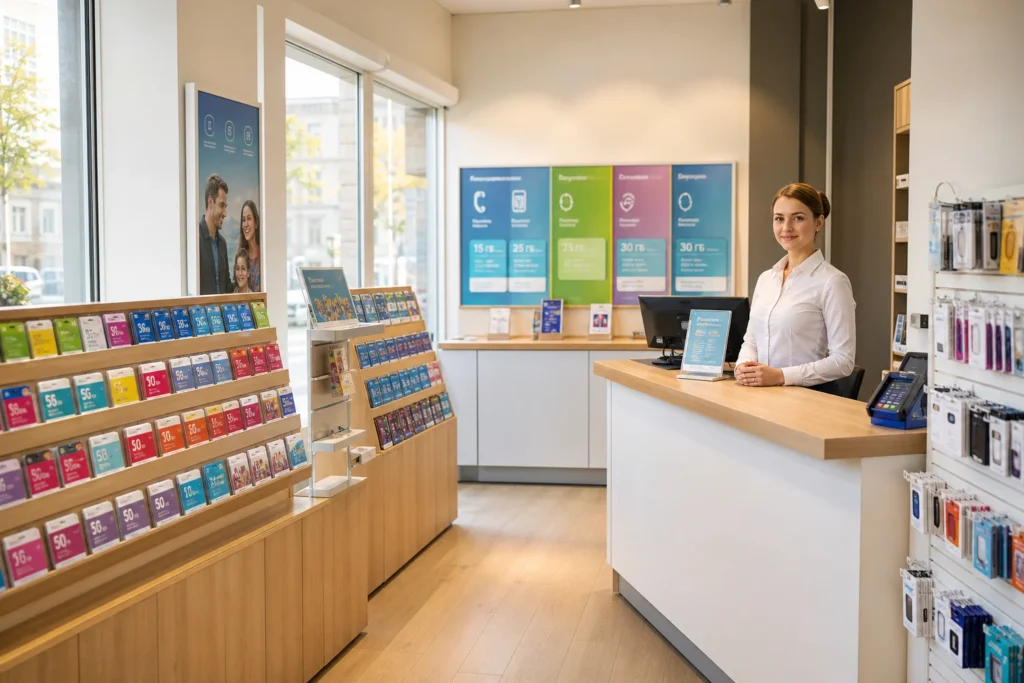
A local SIM card in Murmansk gives you fast mobile data and local phone numbers without international roaming charges. This guide is for visitors arriving in Murmansk without a Russian mobile number.
The recommended option: visit a mobile operator shop (MegaFon, Beeline, MTS or Rostelecom Tele2) with your passport and migration card, and register through Gosuslugi on the spot. For short stays under 90 days, you do not need a SNILS (Russian social security number), but the process takes longer than before—about 30–45 minutes—because the operator verifies your data against the state database.
Current access notice: As of October 2026: New Russian regulations effective January 1, 2025 require all foreign nationals to submit biometric data (photo and voice sample) and register through the Gosuslugi state portal to purchase a SIM card. For stays under 90 days, you do not need a SNILS (Russian social security number). The process takes 30–45 minutes. Foreigners are limited to 10 active SIM cards per person across all operators. Rules and procedures may change; verify with your mobile operator before visiting.
Quick answer: Walk into an operator shop with your passport and migration card, complete Gosuslugi registration, submit biometric data (photo and voice), and leave with an active SIM card. Total time: 30–45 minutes. Cost is budget for the SIM and prepaid plan, with operators offering various data bundles.
At a Glance
| Total time | 30–45 minutes |
|---|---|
| Typical cost | ₽ |
What You Need Before You Start
- Valid passport with entry stamp into Russia
- Migration card (received on arrival)
- Mobile phone (GSM-unlocked)
- Active email address (recommended)
- Phone's IMEI number (the operator may ask for it)
Compare Your Options
| Option | Duration | Price | Notes |
|---|---|---|---|
| Physical SIM card at an operator shop | 30–45 minutes | ₽ | Recommended for most visitors. Widely available in Murmansk city centre. Must present passport and migration card. Data works immediately. You own the physical SIM and can reuse it on future trips to Russia. |
| eSIM purchased before travel | Instant (pre-arrival setup) | ₽₽ | Very few eSIM providers cover Russia as of October 2026 due to regulatory changes. Major international providers like Airalo have suspended Russia service. Not practical for most visitors. |
| Hotel or tour operator assistance | 1–2 hours (negotiated) | ₽₽ | Some hotels or tour operators can arrange a SIM card for you and deliver it to your room, though this costs more. Useful if you're short on time or uncomfortable navigating the process alone. Still requires your passport and migration card. |
| SIM card purchased online before travel | Delivered 5–10 days before travel | ₽₽ | International resellers (e.g., RUS-SIM, Wraptel) sell pre-activated Russian SIM cards with initial balance online. More convenient but pricier than buying in-shop. Card must be activated before your visa/migration card expires. |
| Rostelecom or Tele2 at an official payment kiosk | 30–45 minutes | ₽ | Rostelecom-owned Tele2 operates across 60 regions including Murmansk. Less common than Beeline or MegaFon shops in small cities, but Rostelecom payment kiosks (often in supermarkets or at transport stations) can process SIM registration. Same requirements as operator shops. |
₽ budget · ₽₽ moderate · ₽₽₽ upscale · ₽₽₽₽ splurge. Price levels are estimates compared with typical prices for visitors.
Step-by-Step Instructions
Step 1: Choose a mobile operator and find a shop
The four main operators in Russia are MegaFon, Beeline, MTS, and Rostelecom Tele2. MegaFon has the best coverage in northern regions like Murmansk. In Murmansk city centre, operator shops are easy to find on main streets and in shopping centres. Look for branded storefronts or ask staff at a department store or supermarket. Each operator's shop handles registration and activation on the spot.
Tip: MegaFon is recommended for Murmansk because it has the strongest coverage outside Moscow and Saint Petersburg, particularly in the Russian Far North.
Step 2: Present your identification
Bring your original passport (with the Russian entry stamp) and your migration card to the shop counter. The staff will record your data. Foreign nationals are limited to a maximum of 10 active SIM cards per person across all operators. Inform the staff you are a visitor and need a prepaid SIM for a short stay.
Tip: Keep your migration card in a safe place; you'll need it again at the SIM shop and should carry it whenever you're out.
Step 3: Register through Gosuslugi
For stays under 90 days, you do not need a SNILS number. Instead, the operator will verify your passport and migration card data directly against the Gosuslugi (state services portal) database. This verification step takes time and is why the process now takes 30–45 minutes instead of the previous 15–20 minutes. The operator will handle this verification for you; you do not need to set up a Gosuslugi account yourself beforehand, though having one speeds things up slightly.
Tip: If you have already created and verified a Gosuslugi account in Russian before arriving, registration will go faster.
Step 4: Submit biometric data
As of January 2025, all foreigners must submit biometric data: a photograph and a voice sample. This is done on the spot at the operator's shop or at a partner location. The process is simple and takes a few minutes. Staff will take a photo and record a brief voice sample (usually a few words or a simple phrase). The data is stored in the Unified Biometric System (ЕБС), the state biometric database.
Tip: Speak clearly when providing the voice sample. Wear something you normally would so the photo matches your appearance if you use the SIM abroad later.
Step 5: Choose a prepaid plan and pay
Browse the available prepaid plans displayed in-store or on the operator's website. Plans typically include data, calling minutes, and texts. For short stays, 7–30 day plans with 5–10 GB of 4G data are common and reasonably priced. Tell the staff how many days you'll be in Russia and your expected usage. Payment is in cash (rubles) or card at the shop. Most visitor plans are prepaid, so there are no ongoing charges after your validity period ends.
Tip: Ask for a plan with unlimited calls within Russia if you'll be making local phone calls; these are competitively priced and useful for hotel booking and taxi apps.
Step 6: Receive and activate your SIM
The staff will insert the SIM into your phone (or hand it to you), scan the IMEI of your phone (the unique identifier shown in phone settings), and activate the card on the spot. You'll see network signal appear within moments. Some plans start with a small amount of balance or data already loaded. Confirm that calls, texts, and data are working before leaving the shop.
Tip: Write down your new Russian phone number and keep it handy; you'll need it for ride-sharing apps like Yandex Taxi and for booking hotels.
Common Mistakes to Avoid
- Forgetting your migration card: You cannot buy a SIM without presenting both your passport and migration card. The migration card is a separate document issued to foreigners on entry to Russia.
- Trying to buy without a phone: The operator will ask for the IMEI number of your phone and the SIM will be locked to that device. Bring your phone to the shop.
- Expecting the instant 15-minute process from pre-2025: As of January 2025, the registration process takes 30–45 minutes because the operator must verify your data against the Gosuslugi state database. Plan accordingly and don't rush the shop staff.
- Assuming all operators are equal in Murmansk: MegaFon has the strongest coverage in the Arctic region and northern Russia, including Murmansk. If you plan to travel beyond the city, MegaFon is the best choice.
- Losing or leaving your SIM in a taxi: Once activated, a SIM is locked to your phone's IMEI. If you lose your phone, you'll need to buy a new SIM. Keep your SIM and phone together.
- Attempting to register without your phone present: The operator must record your phone's IMEI to activate the SIM. Bring your unlocked phone to the shop.
Tickets, Payment and Booking
SIM cards are sold at official operator shops (MegaFon, Beeline, MTS/Rostelecom Tele2) located throughout Murmansk city centre. Major shopping centres and supermarkets also have operator kiosks. Walk-in service is available; no advance booking is needed.
Payment methods: Cash (Russian rubles) or debit/credit card. Most visitors’ cards work at Russian retailers, though availability depends on your bank and any sanctions rules in your country. Check with your bank before travel.
Foreigner rules: You must present your passport (with Russian entry stamp) and migration card. The operator will register your SIM through the Gosuslugi state database, which takes time. Biometric data (photo and voice sample) are collected on the spot. Do not rely on third-party resellers or touts; buy only at official operator shops to avoid counterfeit or disabled cards.
Russia Vibes Tips
- Arrive at an operator shop in the morning or early afternoon to avoid long lines, especially on weekdays. Evenings and weekends can be busier, adding to wait times.
- If your migration card has not been processed yet or is missing, visit your hotel concierge or the local migration office (USVN) to resolve this before buying a SIM. Without it, you cannot register.
- Download the Gosuslugi mobile app and create a verified account before arriving if possible; this will speed up in-shop registration. However, it is not required for stays under 90 days.
- MegaFon SIM cards come with a 30-day 'Welcome' tariff for visitors in some seasons, offering good value for data and calls. Ask staff about current visitor offers.
- Keep your SIM receipt and the phone number you receive. You'll need the number for ride-sharing apps (Yandex Taxi, Uber) and online bookings. The receipt proves your purchase if there are any issues later.
- Check that 4G signal is active on your phone before leaving the shop. If you see 'No Service' or only 2G/3G, ask the staff to troubleshoot before you leave.
Explore Nearby Buy a SIM Card in Murmansk
Browse more: All How-To · All How-To in Murmansk · All Murmansk · All SIM and Internet
FAQ
Do I need a SNILS (Russian social security number) to buy a SIM as a tourist?
No, not for stays under 90 days. The operator will verify your passport and migration card data directly through Gosuslugi. If you plan to stay longer than 90 days or sign a contract plan, you may need a SNILS; ask the operator.
What is the migration card and do I really need it?
Yes. The migration card is a separate document issued to foreign visitors at the border when you enter Russia. You receive it at the airport or border crossing. Without both your passport and migration card, no operator will sell you a SIM. Keep it safe.
How long does the registration take now?
30–45 minutes. The operator must verify your data against the Gosuslugi state database, which takes longer than the old process (which was 15–20 minutes). Plan time and be patient; there's no way to skip this step.
Can I use my home country phone number with a Russian SIM in my phone?
No, your phone will receive the Russian SIM's number. If you want to keep your home number reachable, use WhatsApp, Telegram or other apps that work over data. Your home provider's roaming service may still work, but charges could be high.
Which operator has the best coverage in Murmansk?
MegaFon has the strongest coverage in Murmansk and the Arctic region. If you plan to travel outside the city, MegaFon is the best choice. Beeline and MTS also work in Murmansk city centre.
What if my phone is locked to my home carrier?
You must use a GSM-unlocked phone. Contact your home carrier before travel to unlock your phone. Some phones cannot be unlocked; in that case, you'll need to buy a cheap unlocked phone in Russia.
Can I buy a SIM if I don't speak Russian?
Yes, but it helps to learn a few phrases or use a translation app. Operator shop staff in Murmansk may speak some English, especially in city-centre shops. Write down your phone's IMEI number before visiting (find it in phone settings) so you can show it rather than speak it.
What happens if my SIM doesn't work after I leave the shop?
Return to the shop with your receipt and phone. Staff will troubleshoot free of charge. Most issues are misconfigurations or settings. If the phone isn't receiving signal, it may be locked to another network; ask the operator to check. If you've left Murmansk, contact the operator's customer service by calling the number on your receipt.
Russia Vibes is a one-person project. A coffee keeps it going
Not legal advice. This is general information for visitors. Rules on visas, entry, registration, customs and similar matters change often and can depend on your nationality. Check the official source and, if in doubt, ask your embassy or a qualified adviser.
How we research and update our guides
About this guide: AI assistance and accuracy
This guide is created with the help of AI and is based on official sources where available. Mistakes can still happen. Opening hours, prices, rules and other details are given to the best of our knowledge as of the date shown and can change without notice. It offers general recommendations only, not professional, legal or travel advice. Please confirm important details with the official source before you travel; you are responsible for your own plans and decisions.

Take this guide with you
Get a free PDF of this guide to print or read offline: key facts, tips and a map link on a few clean pages.
Report an issue on this page
Paying for your trip: please read
International sanctions affect payments between Russia and many other countries. In practice, cards issued in the EU, the UK, the US and several other countries often do not work in Russia, Russian cards usually do not work abroad, and some booking platforms, airlines and payment providers limit or suspend their services for Russia. The situation changes frequently.
We do not give legal or financial advice, and this site does not encourage anyone to break or circumvent sanctions. Whatever you plan, you are responsible for following the laws and regulations that apply to you, including those of your country of residence and citizenship.
Many travelers still organise their stay lawfully. It is worth asking your bank or payment provider what is currently permitted, contacting hotels, tour operators and carriers directly about the payment methods they accept, and checking which services are open to customers from your country. Clarify payment, cancellation and refund terms before you commit to a booking, and keep your plans flexible.
Partner links on this site may not be available in every country, and prices, availability and rules in our guides can differ from what you see when you book.