
Updated
Staying connected in Sochi is essential for navigation, messaging and booking accommodation. International roaming is extremely expensive, and local SIM cards are no longer available to foreign tourists. The practical solution for most visitors is an international eSIM purchased before arrival, or a prepaid SIM from one of Russia’s four major networks available at the airport.
This guide covers where to buy mobile connectivity in Sochi, which network works best, activation steps, and realistic alternatives including eSIM options and international roaming. Mobile connectivity in Sochi for tourists is straightforward once you understand the current options.
Current access notice: As of October 2026: Foreign eSIMs and international roaming connections in Russia experience a 24-hour reconnection window when first activating. This is a government policy and may cause your connection to cycle on and off the first time. This is expected and will resolve automatically. Physical prepaid SIMs purchased locally do not have this restriction.
Quick answer: Buy an international eSIM before arriving (fast, no paperwork) or purchase a prepaid SIM at Sochi Airport from MTS, MegaFon or Beeline upon arrival. eSIM setup takes 2–5 minutes; airport SIM activation takes 10–15 minutes. Total cost is budget to moderate depending on your data needs.
At a Glance
| Total time | eSIM: 2–5 minutes (pre-arrival setup online). Airport SIM: 10–15 minutes (purchase and activation). |
|---|---|
| Typical cost | ₽₽ |
What You Need Before You Start
- A smartphone that supports eSIM (newer iPhones and Android phones) OR a standard unlocked phone for a physical SIM
- Payment method for eSIM (foreign credit card, PayPal or Apple Pay) or cash in rubles for airport SIM
- Email address to receive eSIM activation code (if buying eSIM online)
- Your phone must be powered off before inserting a physical SIM card
- Passport (though rarely checked for prepaid SIM purchase at airport)
Compare Your Options
| Option | Duration | Price | Notes |
|---|---|---|---|
| International eSIM (recommended) | Setup 2–5 minutes (before arrival); plans last 7–30 days | ₽₽ | Purchase online before arriving. No paperwork, no queues. Activates instantly upon landing. Most reliable option for tourists. Coverage in Sochi is solid (4G/LTE). Providers include Yesim, Holafly, Airalo and Ubigi. No need for cash or working foreign cards. |
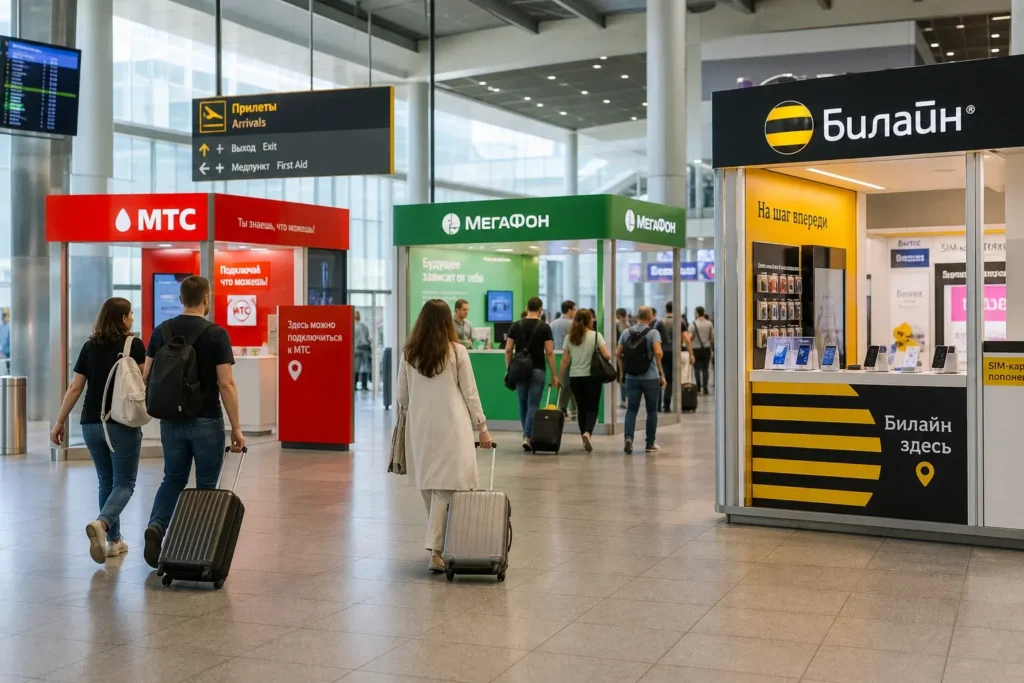
| Prepaid physical SIM at Sochi Airport | Purchase and activation 10–15 minutes | ₽₽ | Available at kiosks in arrival hall, typically 6 AM–late evening. MTS, MegaFon and Beeline all have outlets. Requires cash in rubles. Tourist plans include 5–30 GB for 7–30 days. Activation is automatic or confirmed by SMS. |
| City SIM shop (not recommended for tourists) | As needed; shops open 10 AM–8 PM typically | ₽₽ | Prepaid SIM cards are available at mobile shop chains in the city center (Nevsky Prospekt, coastal promenade). However, locals' plans require Russian identification for setup. Tourist plans may be limited. No advantage over airport purchase. |
| International roaming with home carrier | Immediate | ₽₽₽₽ | Extremely expensive: typically €5–€15 per MB. A few hours of normal use can cost €50+. Only use this as emergency backup if eSIM fails and you cannot find a local SIM quickly. |
| Airport Wi-Fi | Unlimited while in airport | Free | Available in arrival hall, but requires a Russian phone number for SMS verification. Foreign visitors cannot use this. Not a practical option. |
₽ budget · ₽₽ moderate · ₽₽₽ upscale · ₽₽₽₽ splurge. Price levels are estimates compared with typical prices for visitors.
Step-by-Step Instructions
Step 1: Choose eSIM or physical SIM
Decide before departure. eSIM is faster and requires no paperwork: buy online, receive a QR code by email, scan it in phone settings before landing. Physical SIM requires a visit to the airport or a city shop after arrival. Most tourists choose eSIM because foreign cards no longer work in Russian payment terminals, making airport SIM purchase difficult if you cannot pay in cash.
Tip: eSIM is recommended for first-time visitors with compatible phones; it removes the need to find cash or a working card at the airport.
Step 2: If buying eSIM: Purchase online before departure
Go to an international eSIM provider such as Yesim, Holafly, Airalo or Ubigi. Select your data plan (typically 5–30 GB for 7–30 days). Enter your email, pay with a foreign credit or debit card, Apple Pay, Google Pay or PayPal. You will receive a QR code by email within minutes. Save this email or screenshot the code.
Tip: Holafly uses the MTS network (very good national coverage). Yesim and Ubigi use Beeline and T2 combined and will auto-switch for the strongest signal.
Step 3: If buying eSIM: Install before landing
While still on Wi-Fi at home or at the airport, open your phone's Settings app. Go to Mobile/Cellular plans or Connectivity (varies by phone). Select Add Cellular Plan or Add eSIM. Scan the QR code from your email. The eSIM will install instantly. Power off airplane mode only after landing; the eSIM should auto-connect within 1–2 minutes.
Tip: Do this on home Wi-Fi before boarding so you have no surprises at the airport.
Step 4: If buying physical SIM at airport: Locate the kiosk
After clearing customs and baggage claim, follow signs in the arrival hall to the telecom kiosks or branded outlets. Major providers include MTS, MegaFon and Beeline; most operate from early morning (around 6–7 AM) until late evening to match flight arrivals. The kiosks are in the common area, typically on the 1st floor near the exit.
Tip: All three providers offer similar coverage in Sochi. MTS and MegaFon have the most kiosks at the airport.
Step 5: Purchase a prepaid tourist SIM package
Ask for a tourist prepaid plan (5–30 GB data with included minutes). The cashier will insert the SIM into your phone, or you can do it yourself if the SIM is handed to you. Payment is cash in rubles; very few kiosks accept foreign cards. Packages typically cost between ₽600 and ₽1200 for a 7–30 day bundle. Ask which network (MTS, MegaFon or Beeline) has the best reception in your accommodation area.
Tip: Bring cash from home or ask hotel staff where to exchange money; airport exchange rates may be unfavorable.
Step 6: Activate the SIM
If the cashier has not activated it, the SIM will usually activate automatically when you power on your phone and it connects to the network. A welcome SMS in Russian will confirm activation. You should see signal bars and the network name (MTS, MegaFon or Beeline) at the top of your screen within 2–3 minutes.
Tip: If activation seems slow, restart your phone or toggle airplane mode off and on.
Step 7: Enable data and roaming
Go to Settings > Mobile Data (or Cellular Data) and turn it on. Go to Settings > Mobile Network or Cellular > Mobile Data Options and enable Data Roaming (this is not international roaming; it is domestic roaming within Russia, which is now free on all networks). You should now see 4G or LTE next to the signal bars, indicating active internet.
Tip: In Russia, data roaming between regions is free; you pay only for the plan, not for moving between cities.
Step 8: Test your connection
Open a map app (Google Maps or Yandex Maps) or a messaging app and try loading a page or sending a message. If it works, you are connected. If not, restart your phone and wait 1–2 more minutes. eSIM users: you may experience a 24-hour activation window in which the first connection requires internet routing through Russia's network; this is normal and will clear automatically.
Tip: Download offline maps before arriving so you can navigate without data if needed during the activation period.
Common Mistakes to Avoid
- Assuming you can activate an eSIM at the airport without advance planning. If your eSIM arrives late or you cannot find Wi-Fi, you will have no internet upon landing. Buy and install eSIM at home before departure.
- Expecting to use a foreign credit card at an airport SIM kiosk. Almost all accept cash only due to payment processor restrictions. Carry rubles or use a currency exchange booth before approaching the kiosk.
- Ignoring the 24-hour activation window for foreign eSIMs introduced in October 2025. Your eSIM may briefly reconnect and disconnect on first use; this is expected and will resolve automatically. Do not assume it has failed.
- Buying a SIM 'for roaming' advertised at shops. These are often for people leaving Russia and may not work for incoming tourists or may require pre-activation by a local. Always ask for a 'tourist prepaid plan' (туристический пакет).
- Turning off data roaming in your phone's settings out of habit. In Russia, domestic data roaming is free; you pay only for the plan. Disabling it will cut your internet when you leave the city.
Tickets, Payment and Booking
Buying eSIM online (recommended): International eSIM providers such as Yesim, Holafly, Airalo and Ubigi operate outside Russia and accept foreign payment methods. You can buy before departure using a foreign credit card, debit card, PayPal, Apple Pay or Google Pay. No Russian bank account or identification needed. Plans typically cost between ₽₽ and ₽₽₽ for 7–30 days of data. Purchase at least 1–2 hours before your flight to allow time for email delivery of the activation code.
Buying prepaid SIM at Sochi Airport: MTS, MegaFon and Beeline operate kiosks in the arrival hall (1st floor), typically open 6 AM–late evening. Tourist prepaid plans cost ₽₽ to ₽₽₽ and include 5–30 GB of data. Payment is cash in rubles; credit cards are rarely accepted. No foreign identification is needed, though you may be asked for a passport (rarely checked for prepaid tourists).
Important for foreign visitors: Local SIM cards have been unavailable to foreign tourists without a Russian government account (Gosuslugi) since January 2025. The prepaid tourist plans sold at airports are your only option for a physical SIM. Standard local plans require Russian identification and cannot be purchased by tourists. An international eSIM is simpler, faster and now the most practical choice for most visitors.
Russia Vibes Tips
- Pre-buy your eSIM at least 1–2 hours before your flight. Email delays are rare but possible, and you want the activation code before boarding. Install it at home on Wi-Fi so you land with internet ready.
- Sochi has excellent 4G/LTE coverage from all major networks in the city center and along the coast. If you book accommodation near the sea, signal will be strong. Mountain areas inland may have weaker coverage; check reviews if your hotel is far from the city.
- Exchange some rubles before leaving home or at an airport exchange booth before you hit the SIM kiosk. Carrying cash avoids the foreign card payment headache and is faster than trying to pay by card.
- Save your eSIM QR code image or email as a backup. If your phone is lost or resets, you can re-scan it on a replacement phone without buying a new eSIM (most providers allow this).
- If you buy a physical SIM at the airport and are unsure about data roaming being enabled, ask the cashier to check your phone settings or enable it for you. They do this routinely and will have you up and running in under 5 minutes.
- Download offline maps of Sochi (using Google Maps, Yandex or 2GIS) on your home Wi-Fi before landing. This way, you can navigate even if you hit the 24-hour eSIM activation window or SIM activation is delayed.
Explore Nearby Mobile connectivity, Sochi
Browse more: All How-To · All How-To in Sochi · All SIM and Internet · All Sochi
FAQ
Can I use my home country's SIM in Sochi?
Yes, but international roaming is extremely expensive—typically €5–€15 per MB of data. A few hours of normal phone use can cost €50 or more. Only use roaming as an emergency backup if your eSIM fails or you cannot buy a local SIM.
What is the difference between eSIM and a physical SIM?
eSIM is digital, installed instantly via QR code, and requires no paperwork. Physical SIM is a plastic card you insert into your phone. For Sochi, eSIM is faster and simpler because you avoid queues and paperwork. Both work equally well once activated.
Is airport Wi-Fi available for tourists?
Yes, airport Wi-Fi exists, but it requires a Russian phone number for SMS verification. Foreign visitors cannot use this. Do not rely on it; buy your eSIM or SIM before or upon arrival.
How long does it take to activate a prepaid SIM at the airport?
Purchase and activation typically take 10–15 minutes. The cashier inserts the SIM, collects payment, and confirms activation via SMS in Russian. You should see signal within 2–3 minutes of powering on your phone.
Which network (MTS, MegaFon, Beeline) is best in Sochi?
All three have solid 4G/LTE coverage in Sochi. MTS has the strongest national coverage overall. For Sochi specifically, all three are similar. If you buy an eSIM, providers like Holafly (MTS network) or Yesim (Beeline/T2 combined) will auto-switch to the best signal.
Do I need a Russian bank account or identification to buy a SIM?
No. Tourist prepaid SIM packages at the airport require no Russian account or special identification. You only need cash in rubles. International eSIMs require no Russian details at all; just a foreign credit card or PayPal.
What is the 24-hour activation window for eSIMs I've read about?
Since October 2025, foreign eSIMs and roaming connections experience a 24-hour reconnection window when first connecting to a Russian network. Your connection may cycle on and off briefly; this is normal and expected. It will resolve automatically. Download offline maps as backup during this window.
Can I top up or add data to my prepaid plan while in Sochi?
Yes. If you buy a local SIM, you can top up via SMS, the network's app, or shops selling prepaid vouchers throughout the city. eSIM plans cannot be topped up once activated; you must buy a new eSIM plan. Buy a plan with enough data for your entire trip to avoid this hassle.
Russia Vibes is a one-person project. A coffee keeps it going
How we research and update our guides
About this guide: AI assistance and accuracy
This guide is created with the help of AI and is based on official sources where available. Mistakes can still happen. Opening hours, prices, rules and other details are given to the best of our knowledge as of the date shown and can change without notice. It offers general recommendations only, not professional, legal or travel advice. Please confirm important details with the official source before you travel; you are responsible for your own plans and decisions.

Take this guide with you
Get a free PDF of this guide to print or read offline: key facts, tips and a map link on a few clean pages.
Report an issue on this page
Paying for your trip: please read
International sanctions affect payments between Russia and many other countries. In practice, cards issued in the EU, the UK, the US and several other countries often do not work in Russia, Russian cards usually do not work abroad, and some booking platforms, airlines and payment providers limit or suspend their services for Russia. The situation changes frequently.
We do not give legal or financial advice, and this site does not encourage anyone to break or circumvent sanctions. Whatever you plan, you are responsible for following the laws and regulations that apply to you, including those of your country of residence and citizenship.
Many travelers still organise their stay lawfully. It is worth asking your bank or payment provider what is currently permitted, contacting hotels, tour operators and carriers directly about the payment methods they accept, and checking which services are open to customers from your country. Clarify payment, cancellation and refund terms before you commit to a booking, and keep your plans flexible.
Partner links on this site may not be available in every country, and prices, availability and rules in our guides can differ from what you see when you book.