
Updated
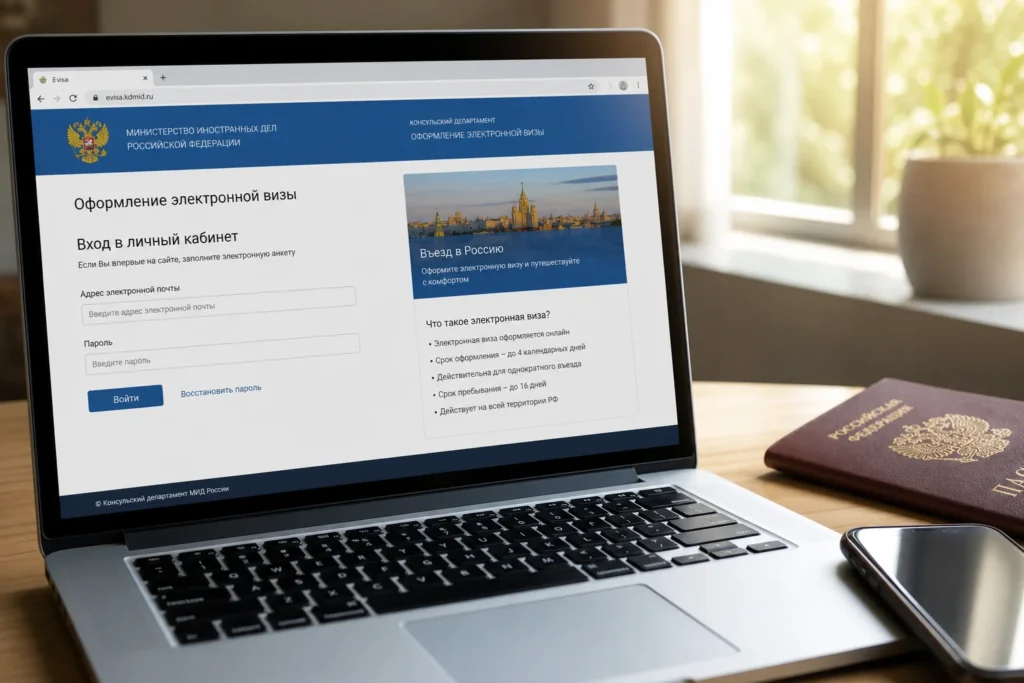
If you hold a passport from an eligible country, the Russian e-visa (also called the unified electronic visa) is the fastest way to enter Kaliningrad. Apply for e-visa Kaliningrad through Russia’s official Ministry of Foreign Affairs website—no invitation or hotel booking required, and approval typically arrives within four calendar days.
Citizens of most EU nations, Switzerland, Norway, Japan, China and several other countries can use this option. Those from the US, UK, Canada, Australia or New Zealand must apply for a standard tourist visa through a consulate instead.
Current access notice: As of October 2026: The Russian unified e-visa system is available through evisa.kdmid.ru. Visa rules, eligible nationalities and fees may change; always verify on the official Ministry of Foreign Affairs website before applying. Foreign visitors' ability to use the e-visa depends on current diplomatic relations and sanctions laws of their home country.
Quick answer: Submit an application on the Ministry of Foreign Affairs website or mobile app between 86 days and 4 days before your planned entry. Applications are processed in no more than 4 calendar days. You receive the approval by email and print or download it to show at the border.
At a Glance
| Total time | 4 calendar days for processing; total preparation and application time approximately 30–45 minutes |
|---|---|
| Typical cost | free |
What You Need Before You Start
- Passport valid for at least 6 months from the date of application
- Digital colour photograph in JPEG format (passport-style, clear quality, full-face view)
- Valid email address to receive the approved visa
- International medical insurance valid in Russia for your entire stay
- Debit or credit card for online payment (if a fee applies in your case)
- Access to the official evisa.kdmid.ru website
Compare Your Options
| Option | Duration | Price | Notes |
|---|---|---|---|
| Russian unified e-visa | Approved within 4 calendar days; valid for 120 days from issue | Free | Single entry with a permitted stay of 30 days from the date of entry to Russia within the visa's validity period. No invitation required. Can be used for tourism, business or cultural events. Apply via evisa.kdmid.ru from anywhere in the world. |
| Standard Russian tourist visa (non-electronic) | 10–20 business days for processing (varies by consulate); valid for up to 4 weeks | ₽₽₽ | Requires a letter of invitation from a Russian organization or hotel. Must apply in person at a Russian consulate or through a visa service. Within the visa period, up to 2 entries into Russia are possible. Allows travel throughout Russia, not just Kaliningrad. Slower but more flexible (multiple entries, longer stay). |
| Visa-free entry (selected nationalities only) | Varies by agreement; typically 30–90 days | Free | Several Latin American countries, such as Argentina, Chile, Colombia and Peru, can enter visa-free. Also includes Israel and South Africa. Confirm your nationality's status on the official MFA website; visa-free agreements can change. |
₽ budget · ₽₽ moderate · ₽₽₽ upscale · ₽₽₽₽ splurge. Price levels are estimates compared with typical prices for visitors.
Step-by-Step Instructions
Step 1: Check your country eligibility
Visit the official Russian Ministry of Foreign Affairs e-visa portal at evisa.kdmid.ru and check whether your nationality appears on the approved list. The site displays eligibility by country. Citizens of most EU states, Switzerland, Norway, Japan and China are eligible, but the full list of approximately 60 nationalities is posted on the portal. If your country is not listed, you must apply for a standard tourist visa through a Russian consulate.
Tip: Screenshot the eligibility list or note the date you checked, as the list can change.
Step 2: Prepare your digital photo
Photograph yourself or obtain a clear digital passport photo in colour (JPEG format only). The photo must show your full face, be well-lit, have a plain background, and meet the dimensions specified on the application form. Poor-quality photos—blurry, underexposed, angled or with hats and sunglasses—cause rejections and delays. Download the photo specifications from the evisa.kdmid.ru website before taking the photo.
Tip: Use a plain white or light-coloured wall as your background; natural daylight works best.
Step 3: Scan your passport information page
Open the first page of your passport (the page with your photo, name and passport number) and scan or photograph it clearly. Save it as a JPEG file. The image must be readable—check that all text is sharp and visible. Many rejections occur because the scan is too dark, angled or blurry. If your scan fails at upload, try again with better lighting or a fresh scan.
Tip: Place your passport on a flat white surface and photograph it straight-on under good light.
Step 4: Create an account on the official portal
Go to evisa.kdmid.ru and register a new account using your email address and a password. Verify your email by clicking the link sent to your inbox. Log in to your account. This account will store your application and allow you to download your visa later. Use a personal email address you can access easily while traveling.
Tip: Save your login details securely; you'll need them to check your application status and download the visa.
Step 5: Start a new e-visa application
In your account, select 'Create New Application' or similar option. The form will ask whether your visit is for tourism, business, or humanitarian purposes. For most visitors, select 'Tourism'. Then enter your personal details: full name (as it appears in your passport), date of birth, passport number, passport expiry date and gender. Every field must match your passport exactly; any discrepancy will cause rejection.
Tip: Copy information directly from your passport to avoid typos that trigger automatic rejections.
Step 6: Upload your photo and passport documents
Upload your digital facial photo in JPEG and a digital image of your passport's information page in JPEG format. The form will show file size and format requirements. If your files are too large, compress them using an online tool or your phone's image editor. Check that the uploaded images are legible before proceeding; if they appear blurry or incomplete, delete and re-upload.
Tip: Test uploading your files before you start the application to avoid last-minute surprises.
Step 7: Enter your travel details
Indicate your planned date of entry into Russia. You must apply no earlier than 86 days before your entry date and no later than 4 days before. If you select a date fewer than 4 days away, your application will be rejected. The form will also ask for your intended port of entry—select the relevant Kaliningrad checkpoint (air, sea or land crossing). Ensure the checkpoint matches how you will actually arrive.
Tip: If your travel dates are not yet firm, apply closer to your confirmed arrival date to avoid expired visas.
Step 8: Review all details before payment
The form will display a summary of your information: name, passport number, travel dates and entry point. Check every field carefully. Names, dates and passport numbers are the most common sources of errors. If anything is wrong, use the 'Back' button to edit. Once you click 'Submit', the details are locked and cannot be changed without reapplying.
Tip: Read the summary aloud to yourself or ask someone else to verify it matches your documents.
Step 9: Pay the consular fee online
The system will show the fee amount (if any applies to your nationality—some nationalities are charged, some are not). Payment is made via the Ministry's platform using major international payment systems (Visa, MasterCard, etc.). Enter your card details and confirm the transaction. Refunds are not available regardless of application outcomes. You will receive a payment confirmation email immediately.
Tip: Ensure your card has no spending restrictions for Russian transactions; contact your bank beforehand if unsure.
Step 10: Wait for your visa approval
Your application will be processed in no more than 4 calendar days from the date of submission. For approved applications, a notification with a QR code will be received to the applicant's email. Check your email (and spam folder) regularly. The email will contain a link to download your visa approval document. Print a copy or save it to your phone; you must present it at the border.
Tip: Set a phone reminder to check for approval 3 days after submitting, in case you need to troubleshoot.
Step 11: Download and save your visa approval
Ensure you produce a physical copy of the notification using a printer, or securely store a digital version on your mobile device. The approval document will show your name, passport number, validity dates and a QR code. Some travelers print one copy and keep one digital backup. Border officers may scan the QR code or examine the text.
Tip: Photograph your approval document with your phone as a backup, in case your printed copy is lost or damaged.
Common Mistakes to Avoid
- Applying too close to your travel date. The system accepts applications no later than 4 calendar days before entry. If you submit 3 days before arrival expecting processing within 4 days, you risk the visa not being ready in time. Always apply 4–5 days in advance to account for delays or rejection requiring resubmission.
- Uploading a poor-quality photo. Blurry, underlit, tilted or off-centre photos are automatically rejected. Do not use a screenshot from video, a photo with a hat or sunglasses, or an image with a coloured background. Take a new, clear passport-style photo under good lighting before uploading.
- Mismatching details between your passport and the form. If your name in the application differs even slightly from your passport (a missing middle initial, a nickname instead of legal name), the visa will be rejected at the border or during processing. Copy every detail directly from your passport information page.
- Selecting the wrong entry checkpoint. The e-visa is valid only for entry through the specific checkpoint you select (Kaliningrad airport, designated sea ports, or specific land crossings). If you arrive via a different route, border guards will reject it. Confirm your exact entry point—flying into Kaliningrad airport requires selecting that checkpoint.
- Failing to prepare the required medical insurance. Foreign citizens entering on an e-visa are required to have a medical insurance policy valid in the Russian Federation for the whole period of stay. Border guards may request proof. Arrange insurance before travel; some companies send it only by post, so apply early.
- Confusing the old Kaliningrad-specific e-visa (discontinued 2023) with the current unified Russian e-visa. Outdated articles mention an '8-day stay' or 'Kaliningrad-only travel'. Since August 2023 there has been a single e-visa for the whole country. If you read anything about '8 days' or 'only the Kaliningrad region', it dates from before 2023. Use the current portal and disregard old sources.
Tickets, Payment and Booking
Official Application Portal: evisa.kdmid.ru (English, Russian and other languages available). This is the only official source; disregard other websites offering e-visa processing, as they may be resellers or scams charging extra fees.
Payment Methods: The portal accepts international debit and credit cards (Visa, MasterCard and similar). Some payment gateways may block transactions from certain countries due to sanctions; if your card is declined, try another card or contact your bank to lift spending restrictions.
Warning About Resellers: Do not use third-party visa agencies or reseller websites unless you cannot access the official portal. These intermediaries charge additional fees and offer no faster processing—the official system takes the same 4 days. Verify any agency is licensed by the Russian Ministry of Foreign Affairs before paying.
Email Delivery: Your approved visa arrives by email with a QR code and approval text. Download the file immediately and save it to cloud storage as a backup. Print a copy or keep the digital file on your phone to show border officials.
Helpful Links
Compare hotel pricesSearch flights
Advertisement: these are partner links. If you book or buy through them, we may earn a commission at no extra cost to you.
Russia Vibes Tips
- If your country is not on the e-visa eligibility list, start applying for a standard tourist visa immediately, as it takes 10–20 business days. Do not wait until the last week before travel.
- International payment systems sometimes block cards for Russia-related transactions due to sanctions and security rules. Test your card on a small online transaction a few days before applying, or contact your bank to confirm the card will work for Russian government websites.
- Medical insurance is essential. Some travel insurance providers exclude Russia or have limited coverage. Check your policy specifically covers the Russian Federation and covers the full dates of your stay; gaps in coverage can result in rejection at the border or denial of entry.
- Save your MFA account username and password securely. You can log back in to check your application status anytime, and you'll need the account to download your visa approval and any future visa applications.
- If your application is rejected, the rejection reason appears in your MFA account. Common reasons are photo quality, passport details not matching, or an invalid travel date. Read the reason carefully and resubmit with corrections; there is no appeal process, only reapplication.
Explore Nearby Apply for a Visa or E-Visa for Kaliningrad
Browse more: All How-To · All How-To in Kaliningrad · All Kaliningrad · All Other
FAQ
Do I need a visa to visit Kaliningrad?
Entering Kaliningrad means entering Russia, so you need either a standard Russian visa or the unified Russian electronic visa (e-visa). Citizens of certain countries are exempt; check the official MFA list. Most international visitors require one or the other.
Can I apply for an e-visa if I hold a US, UK or Canadian passport?
If you're from the US, the UK, Canada, Australia or New Zealand, you'll need a regular visa. You cannot use the e-visa; apply through a Russian consulate for a standard tourist visa instead.
How long does an e-visa take to arrive?
Applications are processed in no more than 4 calendar days from the date of submission. In practice, many are approved within 2–3 days. Always apply at least 4–5 days before your planned arrival to be safe.
Can I use an e-visa to travel to other Russian cities after Kaliningrad?
Since August 2023 there has been a single e-visa for the whole country. Yes, the current unified e-visa is valid for all of Russia, not just Kaliningrad. You can travel to Moscow, St Petersburg or other regions on the same visa.
What happens if my e-visa is rejected?
The rejection reason will appear in your MFA account. Common reasons include photo quality issues, passport details not matching the form, or an invalid travel date. You can reapply immediately with corrected information. There is no fee for reapplication if you correct the error and resubmit.
Do I need to print my e-visa, or can I just show it on my phone?
Either works. Ensure you produce a physical copy of the notification using a printer, or securely store a digital version on your mobile device. Most border officers now accept digital copies with a QR code. Carry both if possible.
What if I arrive at a Kaliningrad checkpoint without an e-visa?
You will be denied entry and turned back. You cannot enter Russia without a valid e-visa. Always confirm your visa is approved and downloaded before traveling to the border.
Is medical insurance mandatory for e-visa holders?
Foreign citizens entering on an e-visa are required to have a medical insurance policy valid in the Russian Federation for the whole period of stay. Border guards may ask to see proof. Obtain it before arrival; without it, entry may be refused.
Russia Vibes is a one-person project. A coffee keeps it going
Not legal advice. This is general information for visitors. Rules on visas, entry, registration, customs and similar matters change often and can depend on your nationality. Check the official source and, if in doubt, ask your embassy or a qualified adviser.
How we research and update our guides
About this guide: AI assistance and accuracy
This guide is created with the help of AI and is based on official sources where available. Mistakes can still happen. Opening hours, prices, rules and other details are given to the best of our knowledge as of the date shown and can change without notice. It offers general recommendations only, not professional, legal or travel advice. Please confirm important details with the official source before you travel; you are responsible for your own plans and decisions.

Take this guide with you
Get a free PDF of this guide to print or read offline: key facts, tips and a map link on a few clean pages.
Report an issue on this page
Paying for your trip: please read
International sanctions affect payments between Russia and many other countries. In practice, cards issued in the EU, the UK, the US and several other countries often do not work in Russia, Russian cards usually do not work abroad, and some booking platforms, airlines and payment providers limit or suspend their services for Russia. The situation changes frequently.
We do not give legal or financial advice, and this site does not encourage anyone to break or circumvent sanctions. Whatever you plan, you are responsible for following the laws and regulations that apply to you, including those of your country of residence and citizenship.
Many travelers still organise their stay lawfully. It is worth asking your bank or payment provider what is currently permitted, contacting hotels, tour operators and carriers directly about the payment methods they accept, and checking which services are open to customers from your country. Clarify payment, cancellation and refund terms before you commit to a booking, and keep your plans flexible.
Partner links on this site may not be available in every country, and prices, availability and rules in our guides can differ from what you see when you book.