
Foreign credit cards no longer function in Kazan or anywhere in Russia. This guide tells you what payment methods actually work when you’re there—so you won’t discover at a restaurant or metro turnstile that your card is declined.
The recommended approach is to arrive with cash (rubles) and exchange it safely, then decide whether to open a Russian Mir card during your stay. You’ll also learn which apps accept which payment methods and where to find ATMs. This guide covers paying in Kazan, Kazan.
Current access notice: As of October 2026: Russia's payment system operates under international sanctions, making foreign cards non-functional. The Mir card system is fully operational domestically. This situation may change; check your home country's travel advisory and your bank's Russia payment policy before departure.
Quick answer: Bring cash in your home currency and exchange it at the airport or a bank; most restaurants, shops and metro accept rubles. For taxis, use cash or download Yandex Go and select cash payment before you order. If you plan an extended stay, open a Russian Mir card.
At a Glance
| Total time | 5–10 minutes (currency exchange); ongoing throughout your stay |
|---|---|
| Typical cost | Free (currency exchange rates vary; no transaction fees for cash) |
| Last updated | October 18, 2026 |
What You Need Before You Start
- Passport (for currency exchange and opening a bank account)
- Home currency cash (recommended starting point)
- Smartphone (for Yandex Go taxi app and banking apps)
- Internet connection upon arrival (to set up payment apps)
- Russian bank account or Mir card (optional, for extended stays)
Compare Your Options
| Option | Duration | Price | Notes |
|---|---|---|---|
| Cash only (recommended for short visits) | Ongoing | ₽ | Exchange home currency for rubles at the airport or a bank. Use cash for all purchases and taxis. No card needed, simple and widely accepted everywhere, including street vendors and small shops. Best for visitors staying less than a week. |
| Cash + ATM backup (debit card) | Ongoing | ₽ | Bring cash and use an ATM when you run low. Your home country debit card works at ATMs inside banks and airports. Expect a fee from your bank (typically 1–3% or a flat amount). Works for emergencies if you run out of cash unexpectedly. |
| Russian Mir card (for stays over one week) | 1–2 hours for opening + ongoing | ₽₽ | Open a Mir card at a local bank like T-Bank with your passport and hotel booking. Accepted everywhere—shops, restaurants, ATMs, taxis (via app) and metro. No foreign card fees. T-Bank card opening is fast and often free for visitors. Most convenient long-term option. |
| PayInRussia virtual card (for app payments) | 20–30 minutes to set up | ₽₽ | A workaround service that issues a virtual card linked to foreign payment methods and appears to Yandex Go as a Russian card. Allows in-app taxi payments without holding physical rubles. Requires an account and may have subscription or conversion fees; check the provider's current terms. |
| Western Union or MoneyGram transfer | Several hours to one day | ₽₽₽ | Ask someone to wire you money from abroad, or send money to yourself before arrival. Collect it at a Western Union or MoneyGram location in Kazan (many exist in central areas). Higher fees than ATMs but useful if your debit card isn't working. |
| Pre-departure third-party card services | Setup before arrival | ₽₽₽ | Some fintech companies offer cards that work in Russia despite sanctions; research current options before you leave home, as this landscape changes. Examples include Wise, Revolut or similar. Fees and availability vary; confirm Russia coverage before buying. |
₽ budget · ₽₽ moderate · ₽₽₽ upscale · ₽₽₽₽ splurge. Price levels are estimates compared with typical prices for visitors.
Step-by-Step Instructions
Step 1: Exchange currency at the airport or a bank
Change your home currency to Russian rubles before you leave the airport or arrive at any bank with an exchange desk. Keep your passport with you. Exchange rates are set daily and posted at the desk. Both airport and bank exchanges are safe; avoid street touts offering better rates. Ask for a mix of bills (large denominations for hotels and restaurants, smaller notes for street vendors and taxis). Count your rubles before leaving the exchange window.
Tip: The Kazan airport exchange desk is located in the main terminal near the arrival exits. Banks in central Kazan (on Bauman Street and near metro stations) also exchange currency during business hours.
Step 2: Test cash at your first purchase
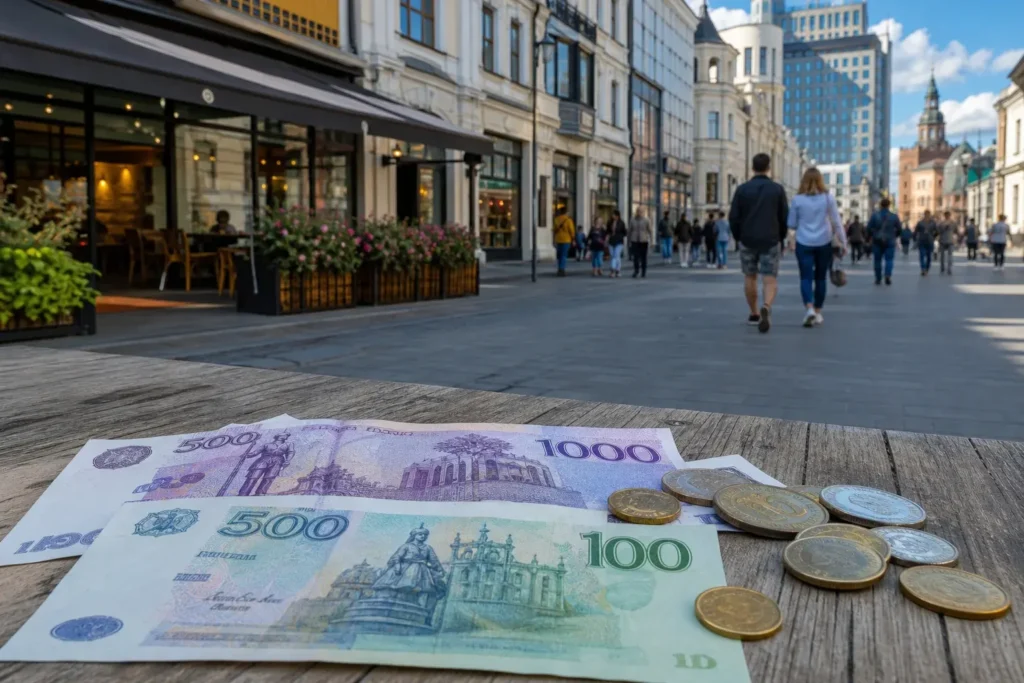
Before relying entirely on cards, use cash for your first transaction (coffee, street food or a small shop item) to get comfortable with the currency and denominations. Russian bills feature historical figures and notable buildings; familiarize yourself with them so you don't hand over the wrong denomination accidentally. Coins are in regular use, so don't dismiss them.
Tip: Prices are often marked with the ruble symbol (₽), which helps you mentally convert quickly at first.
Step 3: Locate an ATM for backup cash
Find an ATM (банкомат) in your hotel or a nearby bank branch for emergency cash withdrawals. Russian ATMs accept international debit cards linked to a major bank—use your debit card, not credit. Enter your PIN; the machine will dispense rubles. Fees vary by your home bank and the ATM operator; check with your bank before departure. ATMs are abundant throughout central Kazan.
Tip: Use ATMs inside bank lobbies rather than street-facing machines for added security, especially at night.
Step 4: Download Yandex Go for taxi payments
Install the Yandex Go app (formerly Yandex Taxi) on your smartphone. Open the app, enter your destination, and before you order, select 'Наличные' (cash) as your payment method. The app will show the fare estimate upfront. When the driver arrives, pay them in cash rubles at the end of your journey. Do not try to add a foreign credit card to the app—it will be rejected.
Tip: Yandex Go is the dominant taxi app in Kazan. Ride-hailing services like Fasten (available in some cities) exist but Yandex Go is most reliable and widely used.
Step 5: Use cash at restaurants and shops
Most restaurants, cafes and shops in Kazan accept cash and some accept Russian-issued Mir cards or mobile payment. Hand over your rubles; the cashier will calculate change. For restaurants, you can leave a tip in cash if you wish (not mandatory but appreciated). If a place has a card terminal (POS), it will likely only accept Mir or Russian bank cards, not foreign cards.
Tip: Contactless mobile payments (Apple Pay, Google Pay) do not work in Russia. Only Mir Pay and local Russian banking apps with linked Mir cards support this.
Step 6: Use metro and transport with cash
Buy metro tokens or travel cards at ticket counters using rubles. You can also board buses and trams by paying the driver directly in cash. Contactless Mir cards work on Kazan metro turnstiles, but foreign cards do not. If you plan multiple metro trips, buy a multitrip card at the station to avoid queuing each time.
Tip: Keep small bills handy for public transport—drivers and ticket vendors may not have large change.
Step 7: For longer stays, consider opening a Russian Mir card
If you're staying more than a week and plan to make regular purchases, consider opening a Mir card at a Russian bank branch (T-Bank has offices in Kazan and accepts tourists). You'll need your passport and evidence of your address in Russia (hotel booking works). With a Mir card, you can pay at nearly any shop, restaurant, ATM and transportation system in the country. The process takes 30–60 minutes.
Tip: A Mir card also lets you use Yandex Go's app payment method instead of paying the driver cash, which is more convenient on rainy days or when you don't have exact change.
Common Mistakes to Avoid
- Assuming your Visa or Mastercard will work: It won't. Foreign credit and debit cards are blocked at every point of sale in Russia, including ATMs and online payments. Arrive with cash or a Mir card only.
- Trying to use Apple Pay or Google Pay: These services don't function in Russia. Mir Pay (a Russian-only alternative) works, but you need a Mir card linked to a Russian bank account first.
- Not having cash on hand for small vendors and street food: Informal vendors, kiosks and some tiny cafes don't have card readers—cash only. Always carry some rubles with you.
- Attempting to add a foreign card to Yandex Go: The app will reject it. Always select 'cash' as your payment method and pay the driver in person.
- Exchanging cash at unofficial touts or street dealers: Rates look better but the notes are often counterfeit or you'll be short-changed. Use only airport exchanges, bank teller windows or official exchange kiosks.
- Leaving the exchange desk without counting your bills: Mistakes happen; count your rubles in front of the cashier and check for damaged or unusual notes before you leave.
Tickets, Payment and Booking
Official payment methods in Kazan:
- Cash: Rubles accepted everywhere. Exchange at the airport or any bank. No fees or delays.
- Mir cards: Russian-issued cards accepted at all shops, restaurants, ATMs, and metro. Open at T-Bank (Kazan locations) or any Russian bank with your passport.
- Foreign cards: Do not use. Visa, Mastercard, American Express and all foreign-issued debit and credit cards are blocked for payments and ATM withdrawals throughout Russia as of March 2022, due to international sanctions. Even if a POS terminal appears to accept your card, the transaction will be declined behind the scenes.
- Mobile payment apps: Apple Pay and Google Pay do not work. Yandex Go (taxi) accepts cash only for foreign visitors (pay the driver in person). Mir Pay works only with a Mir card linked to a Russian bank account.
- Workarounds: Some services like PayInRussia or third-party fintech cards claim to bypass restrictions; research current terms and verify coverage before departure, as rules and providers change frequently. Your home bank must also approve transactions to Russia.
Warnings: Do not exchange cash with street touts or use unfamiliar ATMs in isolated areas. Counterfeit notes exist; inspect bills at the exchange desk. Your home country’s banking rules may restrict any transactions to Russia regardless of payment method—check with your bank and government before traveling.
Helpful Links
Compare hotel pricesSearch flights
Advertisement: these are partner links. If you book or buy through them, we may earn a commission at no extra cost to you.
Russia Vibes Tips
- Pay for Yandex Go in cash, not via app, to avoid the hassle of payment methods. This also saves you from needing a Russian bank account and lets you see the final fare before deciding to take the ride.
- If you're flying into Kazan International Airport, exchange at least enough cash for your first few meals and a taxi to your hotel. The exchange desk is reliable and the airport has ATMs, so you're not locked in if you need more later.
- In central Kazan (around Kremlyovskaya metro, Bauman Street and Kremlin), almost every shop and restaurant accepts both cash and Mir cards. Keep cash handy only for street vendors, small kiosks and tips—most formal establishments will accept either.
- When using an ATM, look for one inside a bank vestibule or a well-lit, busy location rather than a street-facing machine. If the ATM looks damaged or won't read your card, try a different machine; don't assume your card is broken.
- Learn to recognize Russian ruble bills by color and size. The 1000-ruble note is purple, 500 is blue, 100 is green. This helps you avoid handing over too much cash accidentally, especially when tired or in a hurry.
- Contact your home bank before traveling to inform them of your Russia trip and ask whether they support any payments or ATM withdrawals in Russia, given the sanctions. Some smaller banks and credit unions don't, and your card may be blocked for security reasons.
Explore Nearby Paying in Kazan, Kazan
Train stations and river piers near Paying in Kazan, Kazan
 Kazan Railway Station, Kazan
Main image: AI-generated illustration. It may not show the place exactly as it looks.
 Kazan International Airport, Kazan
Main image: AI-generated illustration. It may not show the place exactly as it looks.
Related guides
 Using public transport in Kazan, Kazan: Metro, Trams and How to Pay
Main image: AI-generated illustration. It may not show the place exactly as it looks.
 Getting from Kazan airport to the city, Kazan: Train, Bus and Taxi
Main image: AI-generated illustration. It may not show the place exactly as it looks.
Browse more: All How-To · All How-To in Kazan · All Kazan · All Money and Cards
FAQ
Can I use my foreign Visa or Mastercard in Kazan?
No. Since March 2022, foreign-issued Visa, Mastercard, American Express and other international cards do not work anywhere in Russia for payments, ATM withdrawals or online purchases. Only cash (exchanged in advance) or a Russian Mir card will work.
What if I arrive and have no cash and can't open a bank account?
Use an ATM inside a bank with your debit card (works for some banks despite sanctions—call your bank before arrival to confirm). If that fails, contact your embassy or a money transfer service like Western Union. Avoid street touts. Plan ahead: bring cash or arrange a Mir card before departure.
Can I use Apple Pay or Google Pay in Kazan?
No. Apple Pay and Google Pay do not function in Russia. Only Mir Pay works, but you need a Mir card linked to a Russian bank account first, which requires opening a bank account in Russia.
Do I need cash for everything, or can I use my phone?
As a visitor, you'll need cash or a Mir card for most transactions. Mobile payment apps like Yandex Go (taxi) can work if you pay cash to the driver at the end of the ride. Yandex Go does not accept foreign card details via the app.
How much cash should I bring for a week in Kazan?
Budget depends on your activity level, but ₽₽₽ to ₽₽₽₽ (approximately the cost of a mid-range meal to a few meals) per day for food, transport and attractions is typical. Bring a bit extra and use an ATM if you run low.
Are there ATMs in Kazan, and do they accept foreign cards?
Yes, ATMs are abundant in central Kazan near metro stations, banks and hotels. They may accept some foreign debit cards (especially if linked to a major international bank), but acceptance is inconsistent. Your home bank may block the transaction or impose high fees. Call your bank in advance.
Can I open a bank account as a tourist in Kazan?
Yes, some Russian banks like T-Bank allow tourists to open a Mir card account with a passport and hotel booking. The process takes 30–60 minutes. This is useful if you're staying more than a week.
What's the best way to pay for a taxi—cash or app?
For a foreign visitor, pay cash. Download Yandex Go, select your destination, choose 'Наличные' (cash) as payment, and hand rubles to the driver when you arrive. This avoids the need to link a foreign card to the app, which won't work anyway.
Russia Vibes is a one-person project. A coffee keeps it going
Not legal advice. This is general information for visitors. Rules on visas, entry, registration, customs and similar matters change often and can depend on your nationality. Check the official source and, if in doubt, ask your embassy or a qualified adviser.
Last updated: October 18, 2026.
How we research and update our guides
About this guide: AI assistance and accuracy
This guide is created with the help of AI and is based on official sources where available. Mistakes can still happen. Opening hours, prices, rules and other details are given to the best of our knowledge as of the date shown and can change without notice. It offers general recommendations only, not professional, legal or travel advice. Please confirm important details with the official source before you travel; you are responsible for your own plans and decisions.
International sanctions affect payments between Russia and many other countries. In practice, cards issued in the EU, the UK, the US and several other countries often do not work in Russia, Russian cards usually do not work abroad, and some booking platforms, airlines and payment providers limit or suspend their services for Russia. The situation changes frequently. We do not give legal or financial advice, and this site does not encourage anyone to break or circumvent sanctions. Whatever you plan, you are responsible for following the laws and regulations that apply to you, including those of your country of residence and citizenship. Many travelers still organise their stay lawfully. It is worth asking your bank or payment provider what is currently permitted, contacting hotels, tour operators and carriers directly about the payment methods they accept, and checking which services are open to customers from your country. Clarify payment, cancellation and refund terms before you commit to a booking, and keep your plans flexible. Partner links on this site may not be available in every country, and prices, availability and rules in our guides can differ from what you see when you book.Paying for your trip: please read
Report an issue on this page

Take this guide with you
Get a free PDF of this guide to print or read offline: key facts, tips and a map link on a few clean pages.