
Last updated
Getting around Volgograd by taxi or ride-share app is straightforward and affordable, especially once you understand the payment options available to international visitors. This guide shows you how to book a ride, which apps work best, and how to avoid common payment pitfalls when you don’t have a Russian bank card.
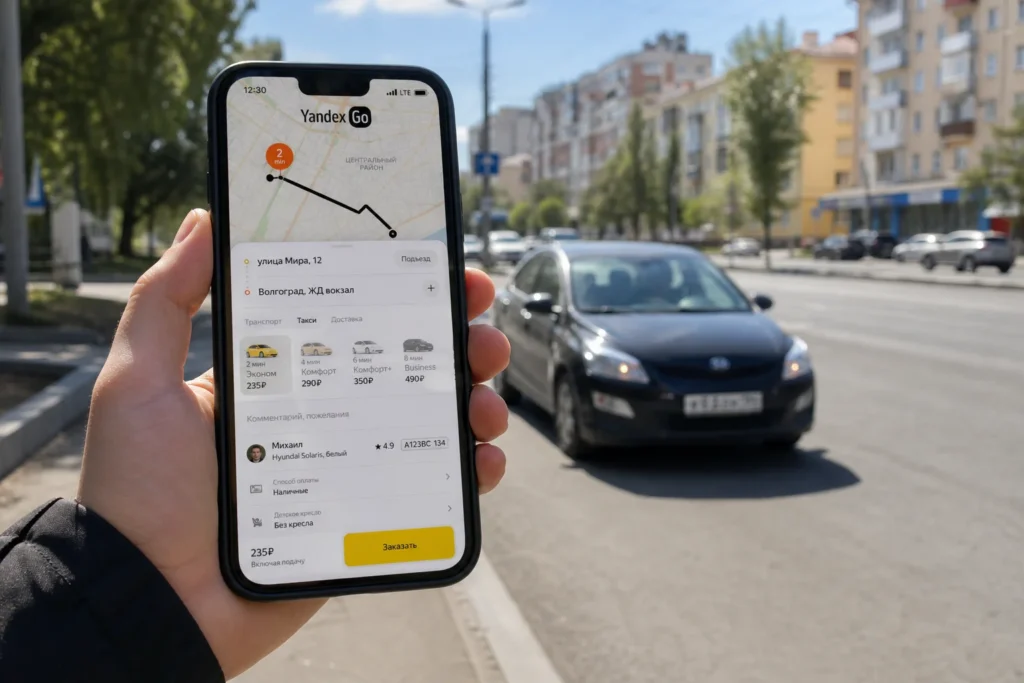
The recommended option is Yandex Go, Russia’s dominant ride-hailing platform, which works in English and lets you pay the driver in cash.
Quick answer: Download Yandex Go, create an account with your phone number, enter your destination in Russian, select "pay in cash," and confirm the ride. Total time: 2–5 minutes to book; pickup usually arrives within 5–10 minutes in the city center.
At a Glance
| Total time | 5–15 minutes from booking to pickup |
|---|---|
| Typical cost | ₽₽ |
| Last updated | October 18, 2026 |
What You Need Before You Start
- Smartphone with internet connection (WiFi or mobile data)
- Phone number (local or foreign; SMS verification may need a local number)
- Destination address in Russian (Cyrillic script)
- Cash in rubles (for payment to driver if paying in cash)
- Yandex Go app downloaded from Google Play or App Store
- Ability to read and respond to SMS codes (for registration)
Compare Your Options
| Option | Duration | Price | Notes |
|---|---|---|---|
| Yandex Go app (Economy class) | Booking 2–3 minutes; pickup 5–10 minutes (city center) | ₽₽ | Russia's dominant ride-hailing platform, available in over 100 cities. Works in English. Cash or Russian card payment. No foreign card support. Best for budget-conscious travelers and those without a Russian bank card. |
| Yandex Go app (Comfort class) | Booking 2–3 minutes; pickup 5–15 minutes (city center) | ₽₽₽ | Same app as Economy but with larger, newer cars and more legroom. Slightly longer wait times and higher fares. Good if you value comfort or are traveling with luggage. |
| Fasten (Ride-share app) | Booking 2–3 minutes; pickup 8–12 minutes (city center) | ₽₽ | Available in Volgograd. Offers Economy, Comfort, and Share classes. Accepts cash or card payment. Interface in Russian but navigation is intuitive. Similar to Yandex Go but often with slightly different pricing. |
| Street taxi (hailing on the street) | 5–15 minutes to find a taxi | ₽₽ | Flag down an unmarked or branded taxi on the street. Fare is negotiated with the driver beforehand (agree in Russian or show destination on phone). Reliable but harder for non-Russian speakers; driver may not speak English. No written confirmation of price. |
| i'way (international transfer service) | Pre-booking online; pickup 15–30 minutes after confirmation | ₽₽₽ | Pre-book at iway.ru. Accepts foreign Visa and Mastercard. Fixed upfront pricing. Professional drivers and set meeting points. Best for airport transfers or arriving without cash, but more expensive than app-based services. |
| Phone booking with a local taxi company | Phone call 2–3 minutes; pickup 10–20 minutes | ₽₽ | Call a local taxi company (numbers often found in your hotel). Fare negotiated by phone. Requires Russian speaker or translation app. Reliable but less transparent than app-based services. |
₽ budget · ₽₽ moderate · ₽₽₽ upscale · ₽₽₽₽ splurge. Price levels are estimates compared with typical prices for visitors.
Step-by-Step Instructions
Step 1: Download and open Yandex Go
Go to Google Play (Android) or App Store (iPhone) and search for "Yandex Go." Download the app and open it. The app interface is available in English. Allow location access so the app can find your current position on the map.
Tip: If you cannot access the Play Store or App Store due to regional restrictions, download the APK directly from Yandex's website or a trusted APK repository.
Step 2: Create your account
Tap the phone number field and enter your international or local phone number (include the country code if using a foreign number, e.g., +44 for UK). Yandex Go will send an SMS code. If registration fails because the SMS doesn't arrive, you can use the Telegram bot method to place rides without full app registration—search for the Yandex Go Telegram bot and message it your pickup and destination.
Tip: Foreign phone numbers work but are slower to verify. A local Russian SIM card (purchased at a kiosk or shop) guarantees faster SMS delivery if you are staying more than a few days.
Step 3: Set up payment as cash
After account creation, open the app and tap your profile or menu. Find "Payment method" and select "Cash" (Наличные). This option avoids the need for a Russian bank card. Do not try to add a foreign Visa or Mastercard—they stopped working in Russia in 2022 and the app will reject them.
Tip: Cash payment is the safest choice for tourists. You will see the estimated fare before you confirm, and you pay the driver exactly that amount when you arrive at your destination.
Step 4: Enter your destination in Russian
Tap the destination field (usually showing "Where to?"). The app can accept both Russian and English, but Cyrillic (Russian script) works more reliably with drivers. Use Google Translate or a Russian map app (Yandex Maps) to convert your destination address to Russian. For example, convert "Central Market" to its Russian name (Центральный рынок) and paste it into the app.
Tip: Save addresses of places you visit frequently (your hotel, train station, key attractions) so you can quickly select them without retyping. Copy-pasting in Russian from Yandex Maps is faster than typing.
Step 5: Select your vehicle class
The app shows vehicle options: Economy (basic sedan), Comfort (larger sedan with more legroom), and Comfort+ (premium sedan). Economy is the cheapest and fastest; most visitors choose it for city trips. Tap your choice and the app instantly calculates a fixed fare estimate.
Tip: At peak times (8 AM–9 AM, noon, 5 PM–7 PM) surge pricing may apply and fares can increase by 20–50%. Booking slightly outside rush hours often saves money.
Step 6: Confirm the ride
Review the estimated fare, pickup location, and destination address. Tap "Order" or the checkmark button. The app will show you a map with the driver's car, real-time location, and estimated arrival time. Your phone number is shared with the driver so they can call if needed.
Tip: Check that your location marker is correct before confirming. If the app shows you on the wrong side of the street, drag the marker to adjust it so the driver knows exactly where to pick you up.
Step 7: Wait for the driver and confirm pickup
The app sends notifications as the driver approaches. When the car arrives, look for the license plate number and car color shown in the app—verify they match before getting in. Some drivers may call you; answer to confirm you are at the meeting point. Get in, greet the driver politely, and confirm your destination if it wasn't clear in the app.
Tip: If the driver arrives at the wrong location (e.g., opposite side of street), cancel the ride and book again with a corrected pickup point. You will not be charged for cancellations within the first minute.
Step 8: Pay the driver in cash
At the end of the ride, the app shows the final fare (usually the same as the estimate, unless traffic delays added time). Tell the driver you'll pay in rubles and hand over the amount shown. Small change is usually available; if not, it is acceptable to round up by a few rubles as a tip. The driver will confirm payment in the app.
Tip: Do not try to negotiate the fare or pay less. The fare is set by the app algorithm and agreed when you booked. Paying the exact amount shown maintains trust with drivers and Yandex Go.
Common Mistakes to Avoid
- Trying to link a foreign Visa or Mastercard to Yandex Go. These stopped working in Russia in 2022 and the app will reject them. Always select "cash" as your payment method instead.
- Not having your destination in Russian script. English addresses work but are often misunderstood by drivers unfamiliar with Latin script place names. Copy addresses from Yandex Maps in Russian to avoid confusion.
- Confirming a pickup location on the wrong side of the street. The app shows a marker; if it appears across the road from where you are standing, drag it to your actual location before booking. Drivers navigate by the app marker, not by guessing.
- Not answering when the driver calls. Many drivers call to confirm they have the right passenger. Keep your phone on and nearby while waiting. If you miss the call, the driver may drive away.
- Canceling and rebooking repeatedly after the driver is assigned. The app charges a cancellation fee after the first minute if you repeatedly cancel. If the first driver is unsuitable, cancel once and rebook; if a second driver is also unsuitable, call customer support.
- Trusting Google Maps directions for meeting points. Specify your pickup location clearly (hotel name, street name, nearby landmark) and verify the app marker is at that spot, not somewhere nearby.
- Assuming surge pricing applies evenly across all apps. Yandex Go and Fasten calculate surge differently and at different times. Compare fares between both apps during peak hours before booking.
Tickets, Payment and Booking
Yandex Go is booked directly through the app (iOS and Android). No pre-booking required; rides are on-demand. Cash payment is selected at setup and confirmed at the end of the journey. Foreign Visa and Mastercard are not accepted; you must select cash as your payment method during registration.
Fasten is also app-based. Download from Google Play or App Store, register with your phone number, and book rides the same way as Yandex Go. Cash and card payments are supported depending on your region.
i’way (iway.ru) is pre-booked online. Enter pickup and destination, select a vehicle class, and pay with a foreign card before booking. Confirmation is instant and the driver waits at the meeting point. This is the best option if you are arriving without cash or a Russian bank card.
Avoid unmarked taxis from the street and unofficial taxi services not listed on official websites. Always use verified apps or your hotel’s recommended taxi service to ensure safety and transparent pricing.
Helpful Links
Compare hotel pricesSearch flights
Advertisement: these are partner links. If you book or buy through them, we may earn a commission at no extra cost to you.
Russia Vibes Tips
- Save cash in a pocket separate from your main wallet before the ride starts. When the driver announces the fare, hand over the correct amount quickly and confidently. This avoids fumbling and shows you respect the agreed price.
- Use Yandex Maps (a free app) to verify your destination's address in Russian before opening Yandex Go. Copy the full address from Yandex Maps and paste it into Yandex Go to ensure accuracy.
- Book your ride at least 2–3 minutes before you need to leave. Morning rush hour (7 AM–9 AM) and evening rush hour (5 PM–7 PM) have longer waits and surge pricing. Traveling mid-morning or mid-afternoon is faster and cheaper.
- If you are staying in one neighborhood for several days, note the names and locations of nearby landmarks or shops in Russian and use them as reference points for pickups. Drivers recognize local landmarks better than street names.
- Take a screenshot of the driver's phone number and car details from the app before the ride starts. If the driver does not show up after 10 minutes, use the number to call and confirm they are coming, or cancel and rebook.
- Tip your driver with small bills (10–20 rubles) or by rounding up the fare if you have had a good experience. This is appreciated but not required. Always hand cash directly to the driver; do not leave it in the car.
Explore Nearby Use Taxis and Ride-Share Apps in Volgograd, Volgograd
Browse more: All How-To · All How-To in Volgograd · All Taxis and Apps · All Volgograd
FAQ
Can I use Yandex Go without a Russian phone number?
Yes, but registration is slower. The app sends an SMS code; foreign numbers can receive it but verification may take longer. If SMS doesn't arrive, use the Telegram bot method: message the Yandex Go bot on Telegram to book rides without full registration.
Why doesn't my foreign Visa or Mastercard work in Yandex Go?
Foreign Visa and Mastercard stopped working in Russia in 2022 due to international sanctions. Only Russian MIR cards and cash are accepted. Select "cash" as your payment method during setup and you will pay the driver directly in rubles at the end of the ride.
How much does a typical taxi ride cost in Volgograd?
A short trip across the city center costs ₽₽ (budget-friendly). Longer trips to the airport or outer neighborhoods cost ₽₽₽. The app shows the exact fare before you book, so there are no hidden charges. Surge pricing during rush hours can increase fares by 20–50%.
What if the driver speaks no English?
Most taxi drivers in Volgograd speak Russian only. The app handles communication; your destination is confirmed in the app, not verbally. If the driver calls, use a translation app to respond. Writing your destination in Russian and showing it to the driver is also helpful.
Can I request a female driver?
Yandex Go does not have a specific option to request a female driver. Some women travelers prefer to ask their hotel reception to book a ride on their behalf, which can sometimes result in a female driver being assigned. Booking through the app shows the driver's photo before arrival, so you can see who is coming.
What if I left something in the taxi?
Open Yandex Go, go to your ride history, find the completed trip, and tap "Contact driver" to message them directly. If that fails, call the driver using the phone number saved in your ride details. Lost-and-found items are usually held by the driver or the company's depot, and recovery is possible within a few days.
Is it safe to travel alone by taxi at night?
Taxi apps are safer than street hailing. The driver's identity, photo, license plate, and route are recorded in the app. Your phone contact is shared with the driver. Verify the license plate and car color before getting in. Sit in the back seat and trust your instincts; if something feels unsafe, cancel and book another ride.
Can I book a ride to a destination outside Volgograd?
Yandex Go offers a "City to City" service for longer trips between cities. Enter your destination and the app calculates a fixed price. This is more convenient than separate shorter rides but costs more. For very long distances (e.g., to another region), a train or intercity bus may be cheaper.
Russia Vibes is a one-person project. A coffee keeps it going
How we research and update our guides
About this guide: AI assistance and accuracy
This guide is created with the help of AI and is based on official sources where available. Mistakes can still happen. Opening hours, prices, rules and other details are given to the best of our knowledge as of the date shown and can change without notice. It offers general recommendations only, not professional, legal or travel advice. Please confirm important details with the official source before you travel; you are responsible for your own plans and decisions.
International sanctions affect payments between Russia and many other countries. In practice, cards issued in the EU, the UK, the US and several other countries often do not work in Russia, Russian cards usually do not work abroad, and some booking platforms, airlines and payment providers limit or suspend their services for Russia. The situation changes frequently. We do not give legal or financial advice, and this site does not encourage anyone to break or circumvent sanctions. Whatever you plan, you are responsible for following the laws and regulations that apply to you, including those of your country of residence and citizenship. Many travelers still organise their stay lawfully. It is worth asking your bank or payment provider what is currently permitted, contacting hotels, tour operators and carriers directly about the payment methods they accept, and checking which services are open to customers from your country. Clarify payment, cancellation and refund terms before you commit to a booking, and keep your plans flexible. Partner links on this site may not be available in every country, and prices, availability and rules in our guides can differ from what you see when you book.Paying for your trip: please read
Report an issue on this page

Take this guide with you
Get a free PDF of this guide to print or read offline: key facts, tips and a map link on a few clean pages.